

What Roblox Studio Deep Links on Stack Traces Changed - 2026
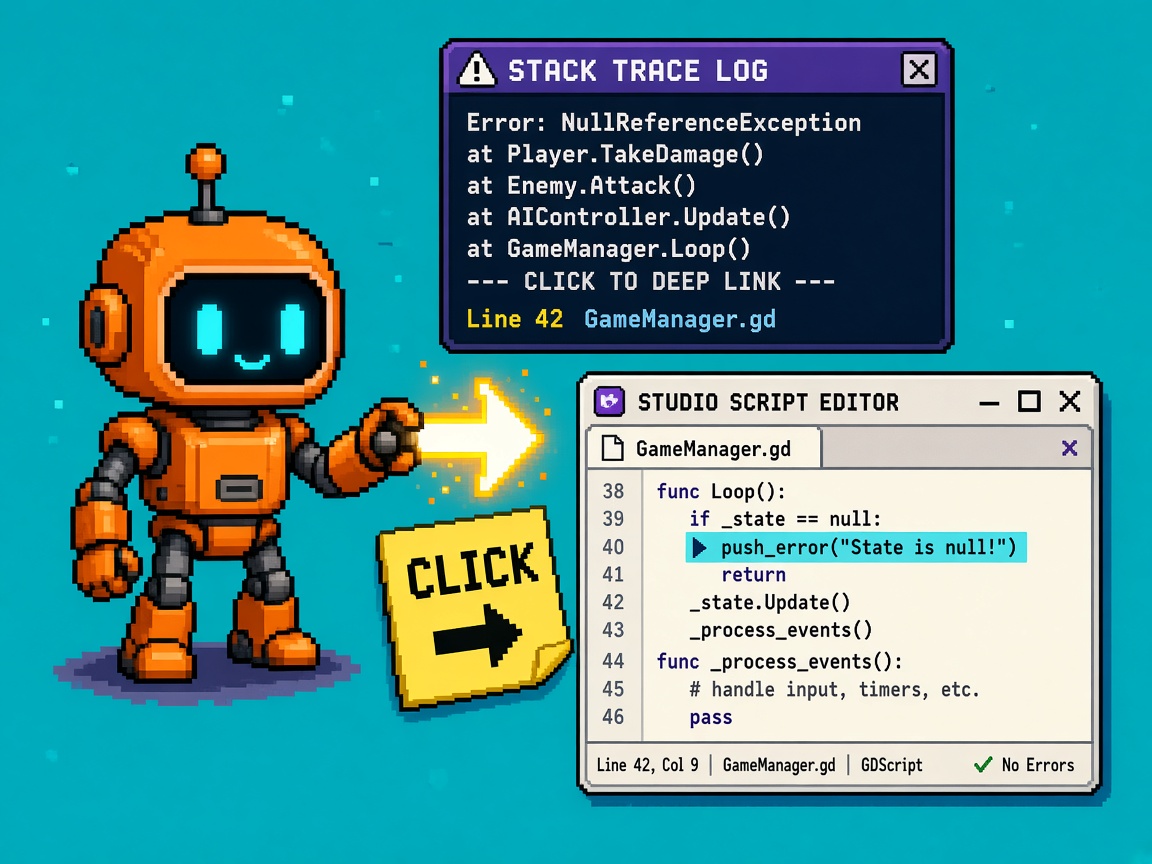
If you searched roblox studio deep links after Roblox shipped Announcing Studio Deep Links on Stack Traces for Server Logs on 23 October 2026, you do not need another “click the error and Studio opens” Discord paste. You need a what-changed map: what Creator Hub hyperlinks actually open (exact place version, script path, line), what structuredStackTrace / IsDynamic mean for tooling, when deep links replace vs only supplement manual repro, and which Team Create / permissions / log-hygiene gates still fail after the click.
Primary source: Announcing Studio Deep Links on Stack Traces for Server Logs. Same-week context: Weekly Recap: October 19–23, 2026. Creator Hub companions: Error Report, Studio docs, Observability / server-management log APIs on Creator Hub. Ambient: Roblox Cube.
This page is the capability / honesty map for server-log → Studio deep links. It is not the Plugin screenshot checks (widget clipboard capture). It is not VIP teleports what-changed. Those own Studio capture and multiplace routing. This URL owns stack-trace deep-link aftermath.
Why this matters now
Server debugging used to mean: open Creator Hub logs, read a blob of stack text, guess which place version was live, open Studio on the wrong script revision, and argue about line numbers that already drifted. Staff now emit structured stack frames and turn stable frames into hyperlinks that open Studio on the exact place version where the error happened — script path, function name, and line.
That is a real latency cut for post-deploy fires. It is also a trap if your team treats the click as a full root-cause ritual: IsDynamic frames stay unclickable (runtime clones), some Roblox-generated errors have no creator stack, Team Create permissions still gate who can open what, and a deep link into yesterday’s place version does not prove today’s working copy is fixed.
Direct answer: Use Creator Hub server error logs → click stable stack frames → land on the logged place version’s script/line. Build tooling on structuredStackTrace. Keep manual repro for dynamic scripts, missing traces, and “fixed in HEAD but broken on that version” cases. If you only remember one sentence: deep links open the version that failed — they do not replace ownership, perms, or repro.
Who this map is for
| Audience | Use it to… |
|---|---|
| Beginners | First click-through from Creator Hub to Studio |
| Developers | Frame fields + IsDynamic + API tooling |
| Creators | Paste a debugging unlock card for Discord |
| Companies | Diligence — version-accurate incident response |
Time: 30–45 minutes for first click-through on a published experience with server errors; longer for Open Cloud tooling.
Honest limit: DevForum + Creator Hub are authority. Log ingestion still has latency (historically ~minutes). Re-read before you freeze an incident playbook.
Non-repetition
| URL | Job |
|---|---|
| Plugin screenshot checks | Studio widget clipboard capture |
| Home Layout Test live UX Stop | Test Home chrome ≠ permanent IA |
| Inspect live server Team Test what-changed | Team Test Server Inspection beta |
| VIP teleports what-changed | VipServerId / ReservedServerId |
| Shapecast upgrade checks | Physics cast upgrade |
| Web testing what-changed | Browser smoke |
| Device Trust checks | Integrity Kick kit |
| Roblox Studio guide | Platform hub |
| HTTP 403 help | Corporate proxy |
| 25 free Discord servers | Paste channel |
| Courses | Learning ladder |
| This URL | Studio deep links on stack traces map |
What changed (plain)
| Before | After (Oct 23, 2026) |
|---|---|
| Stack text to eyeball / copy | Hyperlinked script path + function + line |
| Guess which place version | Opens exact place version that erred |
| Parse strings for tooling | structuredStackTrace JSON frames on log resource |
| Manual “find the script” tax | Click-through for stable frames |
| Dynamic clone scripts opaque forever | Explicit IsDynamic — no deep link |
| Platform errors mixed with yours | Some Roblox-generated errors still no creator stack |
How to use it (beginner path)
- Publish / run a live or test server that can emit a server error you own.
- In Creator Hub, open the experience → server details → Logs (or your team’s server-log entry point).
- Wait for log ingestion (often a few minutes — do not assume instant).
- Expand an error with a stack trace.
- Click a hyperlinked frame (script path / function / line).
- Confirm Studio opens the matching place version and jumps to that script/line.
- Compare that version’s code to your current working copy — note drift.
Beginner done: You can explain that the link shows what the failing server had, not necessarily what is in your unsaved Studio tab.
Success check
| Check | Pass |
|---|---|
| Hyperlink visible on a creator-code frame | Yes |
| Studio opens correct version | Yes |
| Cursor near the logged line | Yes |
| You wrote “version N vs HEAD” note | Yes |
Frame field map (developer)
Server Management log resources now expose structured frames:
| Field | Meaning |
|---|---|
Line |
Line number for the frame |
FunctionName |
Function involved in that hop |
ScriptPath |
Script path string |
ScriptUniqueId |
Script identifier |
IsDynamic |
true → no stable Studio deep link |
Staff shape (conceptual):
GameServerLog + StructuredStackTrace: StackFrame[]
StackFrame:
  Line
  FunctionName
  ScriptPath
  ScriptUniqueId
  IsDynamic
Why frames are not clickable
Staff: frames with IsDynamic = true lack a stable reference to a script in Studio. Most often: script cloned at runtime. Other cases can also mark dynamic. Build incident UI that shows “dynamic — no deep link” instead of a dead button.
Why some errors have no stack
Staff: certain Roblox-generated errors lack stack trace data because they are not connected to creator code. If you believe a creator error is missing a stack, report it — do not invent folklore that “deep links are broken for everything.”
Replaces vs supplements
| Old habit | Status after deep links |
|---|---|
| Manual path hunting in Studio | Replaced for stable frames |
| Opening latest place and guessing lines | Replaced by version-accurate open |
| Full manual repro always | Supplemented — still required for dynamic / missing / env-specific |
| String-parsing stacks in scrapers | Supplemented / replaced by structured fields |
| Error Report chart-only triage | Supplemented — still use counts + “new since version” |
| Phone screenshots of Output | Supplemented — Hub links + plugin window captures for Studio UI bugs |
Decision rule (paste)
- Stable frame + perms OK → click deep link first, then decide if repro still needed.
- IsDynamic → manual search / logging improvement / avoid clone-only identity.
- No stack → platform vs creator investigation; do not rage-close.
- Version ≠ HEAD → fix may already be local; verify the logged version before closing the ticket.
Team Create and permissions honesty
Deep links do not invent access. If a teammate cannot open the place version, edit the script, or join Team Create, the hyperlink fails socially even when the URL is correct.
| Gate | What to lock |
|---|---|
| Experience access | On-call eng can open the universe in Creator Hub |
| Studio place version open | Rights to download/open historical versions you debug |
| Team Create | Editors who triage errors can actually edit |
| Group analytics / logs | Group roles for monitoring (see Error Report docs) |
| API keys / OAuth | universe:read (or current equivalent) for log tooling — beta surfaces |
Company note: Write an on-call checklist: who can click, who can publish a hotfix place version, who owns “dynamic script” debt.
Log hygiene (so deep links stay useful)
Deep links amplify whatever you log. Spammy unique messages still burn Error Report budgets (unique error caps, aggregation windows). Structured logging helps templates/context — but unique player IDs in the message string still fragment counts.
| Habit | Why |
|---|---|
| Template messages without raw user IDs | Consolidate counts |
| Context objects for variables | Searchable without unique-message explosion |
| Severity discipline | Errors vs warnings for triage |
| Rate-limit awareness | Server log rate limits still exist historically (identical + total/min) |
| Avoid clone-script-only stacks for critical paths | Fewer IsDynamic dead ends |
Structured logging ↔ deep links
Prefer patterns that produce stable script identities on hot paths. If your architecture clones Script instances per player for “isolation,” accept that many frames will be dynamic — or refactor to ModuleScripts / shared instances with stable paths when you need clickable production stacks.
Open Cloud / tooling angle
Staff expose structuredStackTrace so you can build dashboards without regexing stack strings. Observability / server-management APIs list game server logs for a universe / place / version / jobId (beta; API key or OAuth). Typical consumer pattern:
- Detect spike via Error Report or your pager.
- Pull logs for the offending
jobId/ version. - Read
structuredStackTraceframes. - Open Studio via Hub for humans; store frame JSON for bots.
- Skip deep-link automation for
IsDynamicframes.
Honest limit: Treat API docs as beta — page sizes, filters, and auth scopes change. Re-read Creator Hub Observability before you freeze a partner integration.
Beginner Monday path
| Block | Minutes | Outcome |
|---|---|---|
| A | 10 | Read DevForum announcement |
| B | 15 | Open Creator Hub Logs on a test experience |
| C | 15 | Click one stable frame into Studio |
| D | 10 | Note place version vs current HEAD |
| E | 15 | Find or force an IsDynamic case (clone script) |
| F | 10 | Update incident doc: click ≠ closed |
Developer depth — incident playbook
Version drift drill (fifteen minutes)
- Ship place version N with a deliberate
error()in a ModuleScript. - Trigger it on a live/test server; wait for Hub logs.
- Publish version N+1 that “fixes” the line but leaves a comment.
- Click the deep link from the N error.
- Confirm Studio shows N, not N+1.
- Write: “Deep link is archaeological — hotfix verification still needs N+1 repro.”
This drill kills the most expensive misunderstanding: closing tickets because HEAD looks fine while production servers still run N.
Clone-script debt card
| Pattern | Deep link? | Mitigation |
|---|---|---|
| ModuleScript require chain | Usually stable | Prefer for shared logic |
| Script cloned per player | Often IsDynamic |
Log context with template IDs; reduce clones |
| Generated source strings | Likely dynamic | Avoid for critical errors |
| Plugin-injected runtime scripts | Case-by-case | Test frames after inject |
KEEP lab / HOLD overclaim (body)
| Decision | When |
|---|---|
| KEEP deep-link-first triage for stable frames | On-call default |
| HOLD “no more manual repro” claims | Always — env/data/race still need repro |
| KEEP version note in every ticket | After every click |
| HOLD tooling that assumes every frame clicks | Filter IsDynamic |
Failure modes
| Failure | Symptom | Mitigation |
|---|---|---|
| HEAD ≠ logged version | “I fixed it” but servers still error | Version drill |
| IsDynamic dead clicks | Team thinks feature broken | Educate + reduce clones |
| Missing platform stacks | Empty expand | Report if creator-owned |
| Perms denied | Link opens nothing useful | On-call access checklist |
| Log lag | Panic before data arrives | Wait / refresh policy |
| Unique-message spam | Can’t find the real error | Hygiene + templates |
| Screenshot-only culture | No structured fields in tools | Adopt structuredStackTrace |
| Client-only confusion | Looking in wrong surface | Server logs vs client Error Report filters |
Excuse ladder
| Excuse | Why it fails | Fix |
|---|---|---|
| “Deep links replace QA.” | Clicks ≠ repro | Supplements rule |
| “All frames should click.” | IsDynamic / platform | Honesty table |
| “I opened latest place.” | Wrong version | Follow the link |
| “No stack = Studio bug.” | May be Roblox-generated | Staff FAQ |
| “Interns don’t need Hub access.” | Can’t triage | Perms gate |
| “We’ll parse stack strings forever.” | Structured field exists | API adopt |
Company / diligence four-liner
- API / UX: Creator Hub server error stacks deep-link to Studio;
structuredStackTraceon log resources (Oct 23, 2026). - Control: On-call Hub+Studio access; version notes; IsDynamic policy.
- Limit: Dynamic frames; missing platform stacks; log latency; not a client-debug silver bullet.
- Evidence: Ticket with version N screenshot + deep-link outcome + repro status.
Discord-ready brief (paste)
Studio deep links on server stack traces (Oct 23, 2026):
Creator Hub error log → click frame → opens exact place VERSION + script/line.
structuredStackTrace fields for tooling. IsDynamic = no click (often runtime clones).
Deep link ≠ “bug closed” — still note version vs HEAD and repro when needed.
What to lock this week
- On-call can open Creator Hub Logs.
- First successful deep-link smoke recorded.
- Incident template: place version field mandatory.
- IsDynamic education in eng onboarding.
- Reduce clone-script-only error paths on P0 systems.
- Error message hygiene pass (no raw user IDs).
- Decide if Open Cloud log pull is in scope this quarter.
- Pair with plugin screenshot checks for Studio UI bugs (different tool).
- Re-read DevForum for copy-stack UX requests / follow-ups.
- Producer sign-off: no “fully automated debug” marketing.
Producer one-pager (paste into Notion)
Title: Stack-trace deep links — what we can claim
Can: Jump from Hub server errors to the failing script/line on the logged place version; parse structured frames in tooling.
Cannot: Deep-link dynamic/cloned scripts; invent stacks for all platform errors; skip repro; ignore Team Create/ Hub permissions.
Owner: Backend / live-ops eng lead.
Revisit trigger: New DevForum notes on stack coverage or Hub UX (e.g. copy button requests).
If marketing needs a public sentence today, use: “Our server error logs now open the exact Studio place version and line that failed — so we debug what production ran, not only what is on someone’s laptop.” Anything that says “one click fixes production” fails diligence.
Sample lab receipt
DEEP_LINK_STACK_LAB_RECEIPT_v1
date:
experience:
owner:
hub_log_opened: yes/no
ingestion_wait_minutes:
frame_clicked: script/line:
place_version_opened:
head_version_at_time:
isdynamic_frame_seen: yes/no
perms_ok: yes/no
manual_repro_still_needed: yes/no
signer:
Key takeaways
- Oct 23, 2026 added Studio deep links on server error stack traces.
- Clicks open the exact place version that produced the error.
- Frames show script path, function, line as hyperlinks when stable.
structuredStackTraceenables tooling without string scraping.IsDynamicframes are not clickable (often runtime clones).- Some Roblox-generated errors have no creator stack.
- Deep links supplement manual repro — they do not retire it.
- Always record version N vs HEAD.
- Team Create / Hub perms still gate success.
- Log hygiene keeps Error Report usable.
- Open Cloud log APIs are beta — re-read scopes.
- Not the same as plugin window screenshots.
- Client vs server surfaces still differ — know which you are reading.
- Community asked for copy-stack UX — nice-to-have, not blocking.
- Companies: diligence = version-accurate incident notes.
- Re-read DevForum when stack coverage expands.
FAQ
What are Roblox Studio deep links on stack traces?
Hyperlinks on Creator Hub server error stack frames that open Studio to the script and line in the exact place version that logged the error (announced 23 October 2026).
Where do I click them?
In Creator Hub when inspecting game server error logs — stack traces show script path, function name, and line as a hyperlink when the frame is stable.
Do deep links open my latest unpublished edits?
They open the logged place version. Your working copy may already differ. Always compare versions.
Why isn’t a frame clickable?
Usually IsDynamic: no stable Studio script reference — commonly runtime-cloned scripts. Other cases exist; treat as “no deep link.”
Why is there no stack at all?
Some Roblox-generated errors are not tied to creator code. Report suspicious missing creator stacks to staff.
Does this replace the Error Report page?
No. Error Report still owns counts, trends, and “new since version.” Deep links speed navigation from server log stacks into Studio.
Can we build our own tools on this?
Yes — use the structuredStackTrace field on the log resource via Server Management / Observability APIs (beta). Filter out IsDynamic before offering “open in Studio” buttons.
Do Team Create permissions matter?
Yes. A link cannot grant edit rights you do not have. On-call access is part of the feature’s real-world success.
Are client errors deep-linked the same way?
This announcement targets server logs stack traces in Creator Hub. Use the right monitoring surface for client issues; do not assume parity.
How long until logs appear?
Historically, server logs can take on the order of minutes to populate in Hub/API. Build wait/refresh into the playbook.
Should we stop writing repro steps?
No. Deep links accelerate finding the line. Repro still proves environment, data, and races — especially when versions drifted.
How does this relate to plugin screenshots?
Different tools. Deep links jump from Hub logs → script. Plugin screenshot checks capture Studio widget pixels to the clipboard for UI/plugin bugs.
Related reading
- Announcing Studio Deep Links on Stack Traces for Server Logs (primary)
- Weekly Recap: October 19–23, 2026
- Error Report
- Roblox Studio documentation
- 12 Free Roblox Plugin Screenshot Checks
- Stop Treating Roblox New Home Layout Test as Live UX
- What Inspecting Roblox Live Servers During Team Test Changed
- What Roblox Private VIP Server Teleports Changed
- 12 Free Roblox Shapecast Upgrade Checks
- What Testing Roblox Games on the Web Changed
- Roblox Studio guide
- 25 free Discord servers
- HTTP 403 help
- Game development courses
- Roblox Cube
Deep links make server errors point at the code production actually ran — keep the version note, respect IsDynamic, and do not retire repro just because the cursor jumped. Print “logged version ≠ HEAD” next to your on-call checklist so FOMO cannot close tickets on the wrong revision.